
How to change Cpanel Password

Note: You can only change your password through the dashboard if you know your current password. If you have forgotten it, please contact our support team to have it reset.

Step-by-Step Instructions:

  1. Log In: Access your cPanel dashboard.
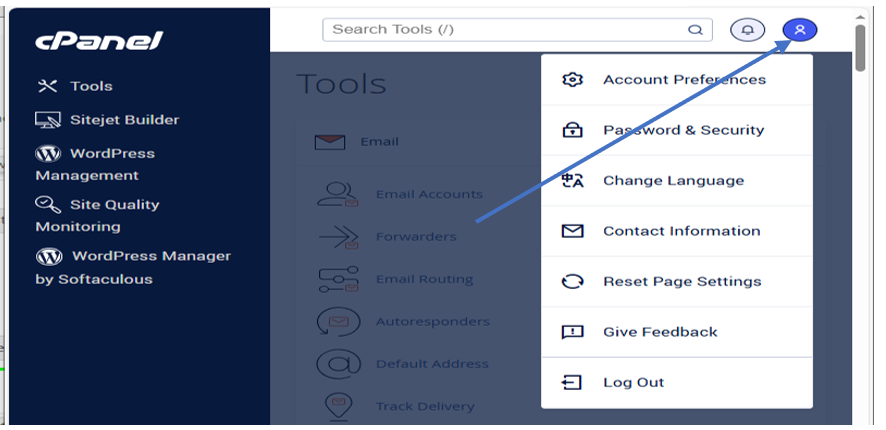
  2. Open User Menu: In the top-right corner of the page (next to the notification "bell" icon), click on the User Menu (represented by your username).
  3. Select Security Settings: From the dropdown menu, click on Password & Security.
  4. Update Credentials:
  • Enter your Old Password.
  • Enter and confirm your New Password.
Save Changes: Click the Change your password now! button to finalize.
  • 8 Utilisateurs l'ont trouvée utile
Cette réponse était-elle pertinente?

Articles connexes

How to change Email Password

Method 1: Changing Your Email Password via cPanel This method is best if you are the account...

How to change Webzim Account Password

If you cannot remember your password for the Webzim Clientzone (where you manage your billing and...

Adding Email Signatures

Text Signatures - On Desktop Thunderbird 1. Open Thunderbird: Launch the Thunderbird application...

Changing PHP Version And Increasing Memory Limit

Scroll down to Software Changing PHP version Find click on Select PHP Version Change current...

How to Install WordPress

Log in to your cPanel account and follow the steps below to set up your website: 1. Locate the...